There Has to Be an Easier Way to Get This Stuff Into the System
A business card scanner for a construction CRM, and the failures that shaped everything.

I appreciate a good business card. The best ones (I think) act as an extension of your personality. If I can look at your business card and tell a little bit about who you are and how you work, then it's safe to say it's done its job. Now imagine if your CRM could look at a business card and know everything about a person? Maybe not some of their deeper, darker secrets, but maybe like, enough to add them as a Contact with as little friction as possible? That feels like it should be doable.
So one night, after I had convinced my 3-month old son to fall asleep, I decided to use my 90ish minutes of freedom before I passed out to work with Claudio to formulate a plan (Claudio is what I call my Claude. Because I have a cool personality, not because I'm losing my mind. And Welcome Home is a banger). The plan ended up being super simple with Fable 5. Here was the first prompt I used:
Could we build a business card scanner app where users could take a picture of multiple business cards in the Salesforce mobile app and have the details stored as Contacts/Accounts inside of TrebleHook?

Please help me refine this to achieve an intuitive and snappy ui and experience.
Why build it at all?
I work on TrebleHook, a CRM for the construction/architecture/engineering industry built on Salesforce. And to be honest, I don't get out much. I mean that as a pun about how I don't go to many conferences (but it's also true that I would rather stay home most of the time). I do, however, work with salespeople all the time. And to be fair, that's part of the reason I don't care to go to many conferences. I get my fill throughout the year (jk I love my sales team <3).
No, the part I do like is the part where I get to partner with the sales team and hear from potential customers, and even current ones, about what their pain points are in their day-to-day. My spidey senses tingle whenever I hear about something that sounds fun to build and high value, and I immediately want to try to find a way to build that thing. Sometimes there are elegant solutions to be found and rich user experiences to be built inside the Salesforce platform, and sometimes you ain't got time to build all that. So you reach for a prebuilt AppExchange solution (Salesforce's app store where people can sell prebuilt solutions that can be installed into your Salesforce org). And SOMETIMES there are frustrating moments when an AppExchange solution you rely on to help a customer solve a specific problem gets delisted and you're left to answer to a disappointed user base (I am not salty).
When this specific nightmare happened to us, it was over a business card scanner that one of our customers was using to enter Contacts from the business cards they collected at conferences and meetings. The concept makes a ton of sense for a CRM. That feels like a thing that you should be able to do pretty easily, but unfortunately, it wasn't an easy thing for us to do. So the requirement sat in the backlog for two years.
So the requirement sat in the backlog for two years.
In that time, I heard the same requirement from a dozen or so other customers and prospects. And I'm not even on every sales call, so I know this pops up in meetings the sales team has. I know that people want this. I was also introduced to AI tools in that time. I used ChatGPT for a year or so. Mostly to summarize meeting notes and draft email responses. And then I met Claudio. I got exposed to some of the possibilities by a colleague at work and I started using Claude to quickly build all kinds of things. So now I had all the requirements I needed from the people who wanted to use it and the means to build something that could be a valuable solution to a legitimate business problem.
What was I thinking?
I knew that I needed this tool to be an LWC (Lightning Web Component) because I have control issues and that is Salesforce's current way of building custom screens with code. If you want to break free from the constraints of the out-of-the-box Salesforce UI, LWCs are the way to go. Time for a little reality check, though. Before this, I had never built an LWC. I'd built on the two older frameworks it replaced, Visualforce and Aura, so I knew the platform, the data, and roughly how the pieces fit together, but this framework was new to me.
Here was the plan:

- Open the Salesforce mobile app
- Navigate to the Card Scanner
- Snap a pic of your business card(s)
- Double-check the data
- Save and next
Simple.
Pretty early on in my relationship with Claude I created a skill from a session we had about refining my solution designs by taking like seven passes over the solution through a different lens each time. I let Claude know that two of my guiding principles in solution design are "quality over quantity" and "show your work to build trust". So even though I presented Claudio with a pretty simple prompt, we had already built a pretty solid rapport. And this is what is still pretty crazy about AI to me. It is for sure a tool that can be used to help you UNDERSTAND way more quickly. That rearview-mirror look at all the context that I’ve given Claude over time allows him to sharpen his responses and produce better outcomes quicker. That efficiency is a huge piece of the puzzle. I could have done dozens of iterations on the plan alone to work it out similarly, but it would have taken me twice as long.
So based on that history, here's what Claude added to the plan without me having to explicitly tell it to:
- A fast path and a careful path. The moment you scan a card, quick pattern rules fill in the fields instantly, so the screen never feels like it's waiting. In the background, the raw text goes to the server, which checks the person and company against what's already in the CRM, with an optional AI pass to clean up whatever the quick rules got wrong. By the time you finish reviewing, the answers are usually already back.
- One source of truth on duplicates. Matching runs in one place, on the server, honoring the org's own duplicate rules. That way the preview you approve and the save that follows can never disagree about whether someone already exists.
- All-or-nothing saves. Companies save first, then people, then the optional link onto a project team, with the card photo attached to each new contact. If any part fails, nothing saves. And everything a batch creates can be undone in one tap.
- The practical constraints, named up front. The scanner only works inside the Salesforce mobile app, so desktop needed a fallback (upload a photo instead). It was worth testing on a real phone before committing to the design: especially whether the camera could keep scanning in one continuous session. (Foreshadowing.)
- A scoped first version. Capture loop, review tray, batch save with duplicate verdicts, and the project-team link, with the AI cleanup pass deferred to the next round. Then it offered to build the skeleton. So I said the word.
All I had to say at this point was "Let's build it!"
How did I test it?
Flashback time: remember when I said I don't get out much? What that ends up meaning here is that I don't have many business cards to test this thing out with. And the ones that I do have are decidedly NOT representative of the AEC industry as a whole. But that ended up being a benefit to my testing because it accidentally made my solution better. It made the tool more adaptable and able to scan anything. So here are the cards I was dealt:
- My wife: the beautiful Managing Editor of Kidney News, a scientific news magazine
- The auto tech that tuned my Golf R a couple years ago (my need for speed goes beyond just delivering value quickly)
- The car salesperson I leased my Jeep from
- One of the consultants on my team
- My own
Basically the dream team of business card variability. Sweet.
So I started scanning. I scanned the first one and HOLY CRAP, IT WORKED! It created my teammate’s Contact and Account perfectly.
What went wrong?
But here was the fatal flaw in my testing. I went straight to the happy path and I took that to mean that Claude was a genie that could do anything (and I was a genius because I figured out how to use Claude to unlock this).
WRONG (on both).
Those wings melt fast when you get up there in the stratosphere: the second test failed hard, and so did the third and fourth. That whole version of the design ended up failing because of one uncomfortable fact: the software that reads a card gets small things wrong, and a small wrong thing in a CRM is worse than a blank space. A blank field, you notice and fix. A plausible-looking mistake, you trust.
The software that reads a card gets small things wrong, and a small wrong thing in a CRM is worse than a blank space.
Turning a photo of a card into usable text is a job called OCR, short for optical character recognition; it's the same kind of technology a bank uses to read a check. On the second test, the OCR misread the email address and mangled the Contact data. The correct address was something like jdoe@acme-env.com. What the software saw was jdoeaacme-env.com: the @ symbol had been read as the letter "a." That one slip can't be undone by simple rules, because once the @ is gone there's no way to know where it used to sit. My first version used a set of pattern-matching rules, and it handled the first card perfectly. On the second card, it quietly produced a Contact with no email address and a nonsense website, and reported success (the scariest part).
The third failure happened when I tried scanning a second card after the first one. The app froze. I couldn't get it to do anything else after the first scan and had to force it closed to recover. Basically, the camera part of the LWC was designed like a conveyor belt, reopening itself for the next scan automatically, over and over. On my iPhone, that second automatic reopen just hung and never came back. The quick fix was to have Claude update the LWC to take one picture per tap, and always reset the camera cleanly when a scan finishes, even when it fails.
Then I tried scanning all five cards at once and found the LWC was reading the scanned words from the wrong place in the camera's results, so it would pull the Contact name from one card but pull the Account name and email from another card. So there are limits to how many you can scan at once.
Another failure happened because the vocabulary was too narrow. I'd taught the tool construction job titles: superintendent, estimator, preconstruction, so when a card read Managing Editor it didn't recognize it as a person's title at all. Teaching software which words to ignore is humbling work.
How did I even pull it off?
I wasn't really looking forward to endlessly training this thing to work reliably, and I was starting to feel like the amount of effort to make this tool trustworthy was going to be too high to defend. The a-ha moment came out of one of those internal team meetings where we spent the majority of the time searching for strong uses for injecting AI into our product. These were (are) frequent talk tracks in many of our internal meetings. So I thought: what if I could improve that initial OCR pass with an AI read?
And so that's what we built.
- The direct AI connection. The scanner sends the messy text from a scanned card to Claude, which cleans it up and returns tidy contact fields. To do that, Salesforce needs a key, which works like a password for the AI service. The important design decision is where that key lives. It is never written in the code, never sent through chat, and never visible to users. It sits in Salesforce’s built-in credential vault, the same secure storage Salesforce uses for connections to banks and other outside systems. The code just says “use the Anthropic connection,” and Salesforce attaches the key behind the scenes. We also built the feature to fail politely. If the AI service is down or unreachable, the scanner still works. You just get the raw scan without the cleanup, and nothing blocks you from saving.
- The Salesforce-native route (Einstein Trust Layer). The second route gets to the same AI models a different way: through Salesforce’s own front door, called the Einstein Trust Layer. Think of it as the difference between mailing a package yourself and handing it to a bonded courier. On this route, your data never leaves Salesforce’s security boundary. Salesforce carries the request to the AI model, applies its own privacy and data-handling protections, and carries the answer back. There is no key to manage at all, because Salesforce owns the whole trip. The trade-offs are cost and control. The Trust Layer route is billed in Salesforce credits and costs more per scan than the direct route. But for companies with strict data policies, that premium buys a guarantee: the card data stays inside the platform they already trust. We built both routes so each customer can pick the one that fits their rules and their budget.
- The switchboard (plug and play with any AI model). The third piece is a small switchboard that sits between the scanner and the AI. The scanner never talks to a specific AI model. It just says “clean up this card.” The switchboard looks at a settings record, which is plain configuration data an admin can edit, and that record answers two questions: which route (direct or through Salesforce) and which model (Claude, GPT-4o, and so on). This means three things in practice:
- Swapping models is a settings change, not a coding project. If a better or cheaper model comes out next month, an admin flips one record and the whole product uses it. No developer needed.
- We can test models against each other on real work. The scanner has a picker that lets you run the same card through different models and compare the results side by side. That is how we confirmed that three different models all fixed the same badly scanned email address the same way.
- The product is not married to any one AI vendor. If a customer prefers a different provider, supporting it means adding one small adapter behind the switchboard. Nothing else in the product changes.
The short version of all three: the AI is a replaceable part, the keys are locked away, the data path is the customer’s choice, and the scanner works even when the AI does not.
Those failures started setting the shape of everything after it. But the human interaction and genuine partnership with an AI coding agent is what closed the gap and made it work.
The freeze was caught by my hands, not its tests. The choice to land on the edit screen immediately after a scan to allow a smoother workflow was mine because I didn't like how many taps it took on the first test. It wrote in a framework I couldn't yet write in myself, and I could tell whether the result was right because I understood what it was supposed to do.
I don't think of this as "vibe coding," where you describe a feeling and ship whatever comes back. I had a clear picture of how the thing needed to be built from the very start: heuristics first so it feels fast, the raw scan always visible so you can check it, every field editable, an AI pass for the mistakes rules can't fix, and undo on everything. Those calls were mine, and they're also what made the whole process safe. When the machine is allowed to be wrong, and you can always see the mistake and take it back, you can move fast without betting the data on it. The agent closed a skill gap I genuinely had. It did not replace the judgment about what to build.
That's the part I'd underline for anyone uneasy about working this way. I'm not a front-end specialist, and I didn't turn into one overnight. I brought a decade of knowing how these systems should behave, paired it with a tool that could write in a framework I was still learning, and shipped something I'm confident beats the default. The gap it closed was mine.
So what does it look like now?
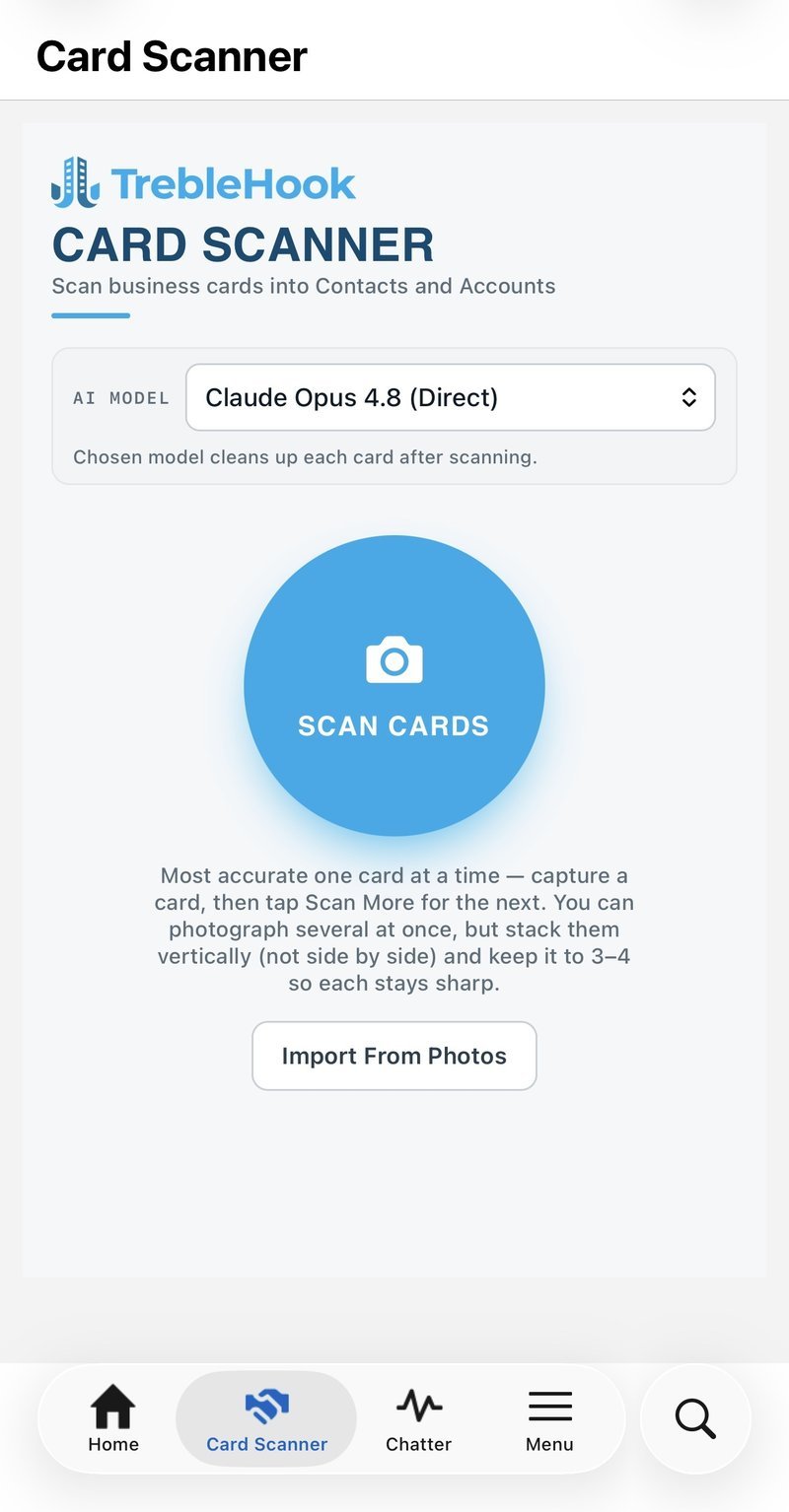
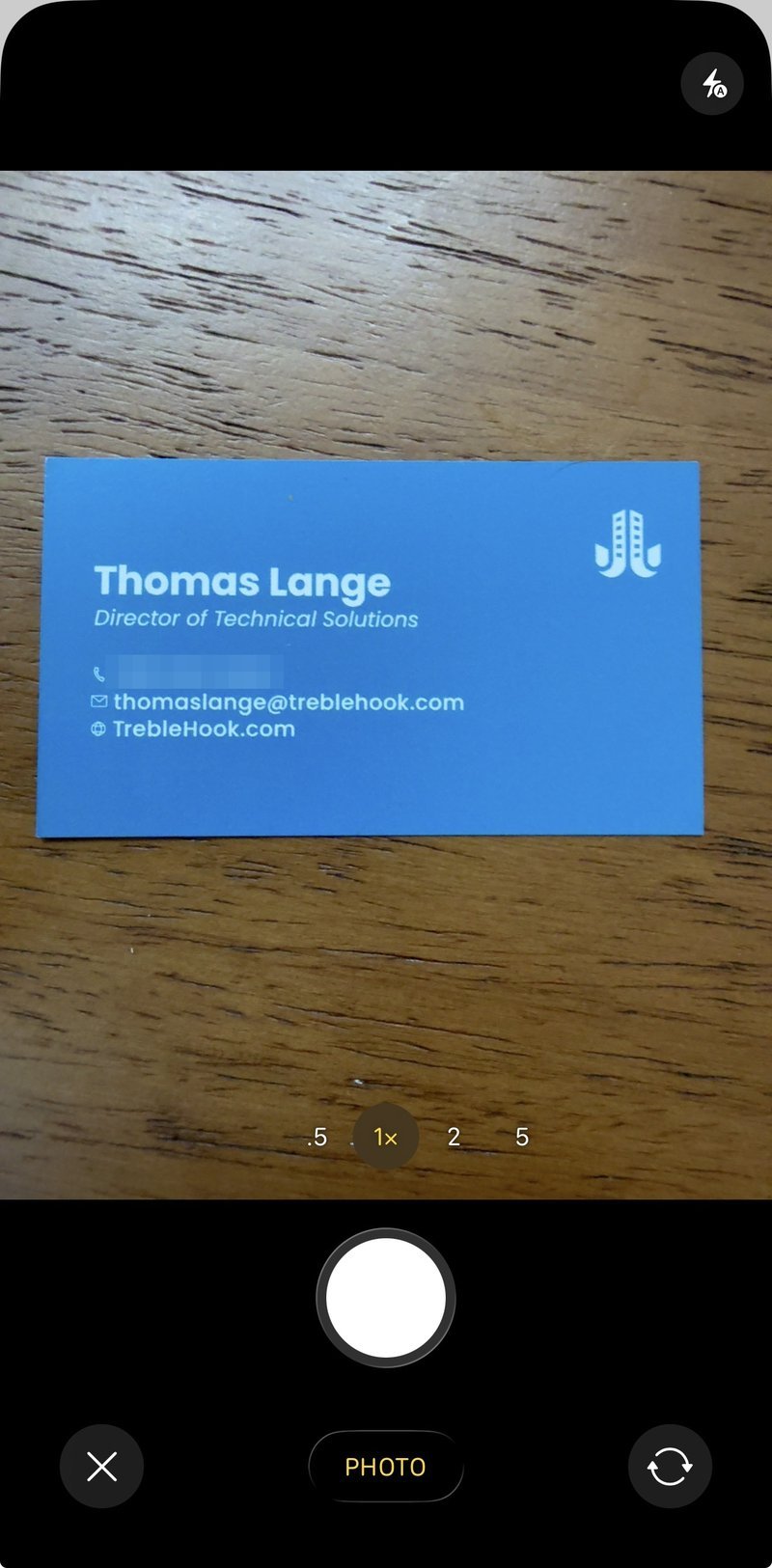
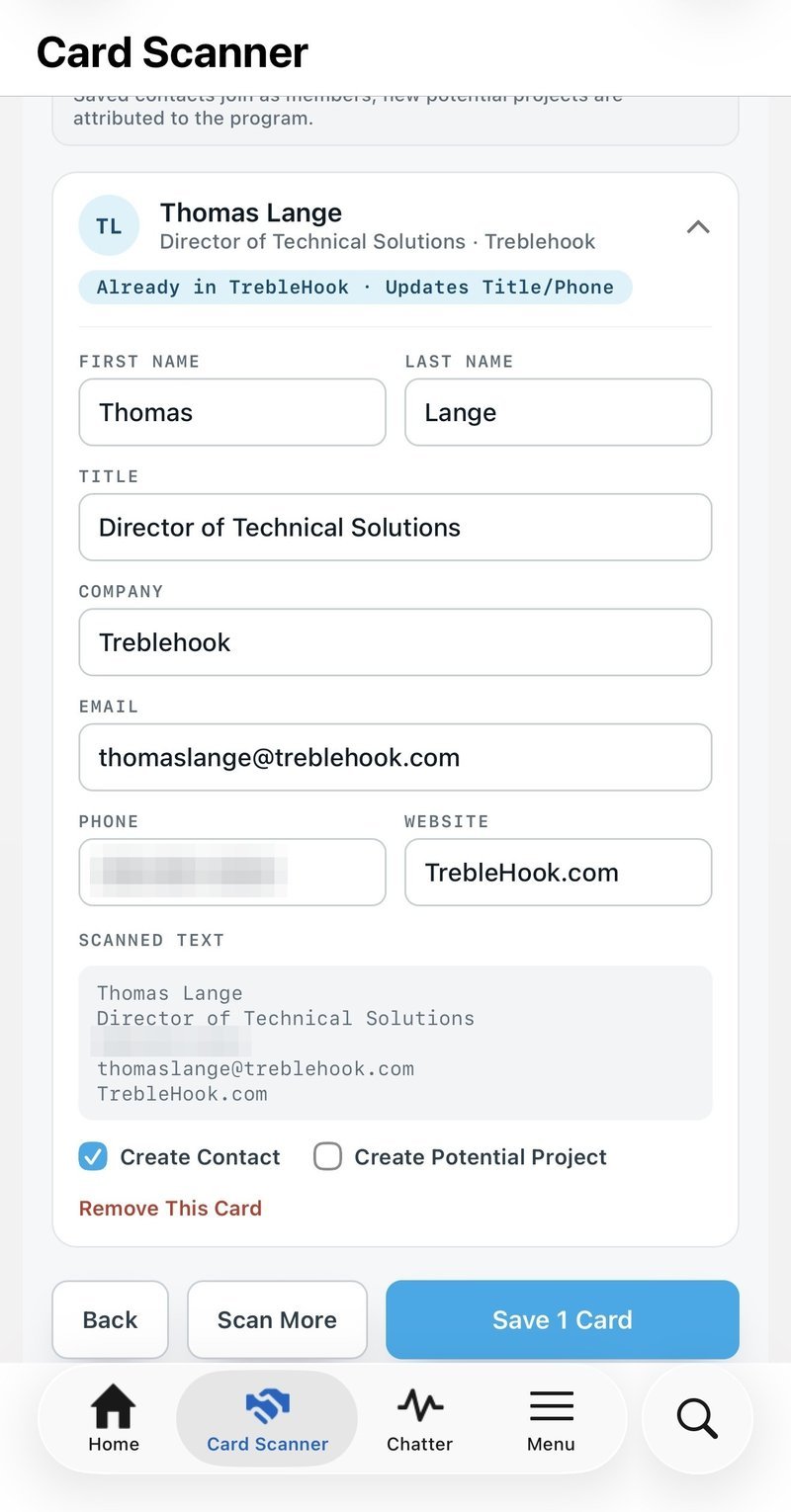
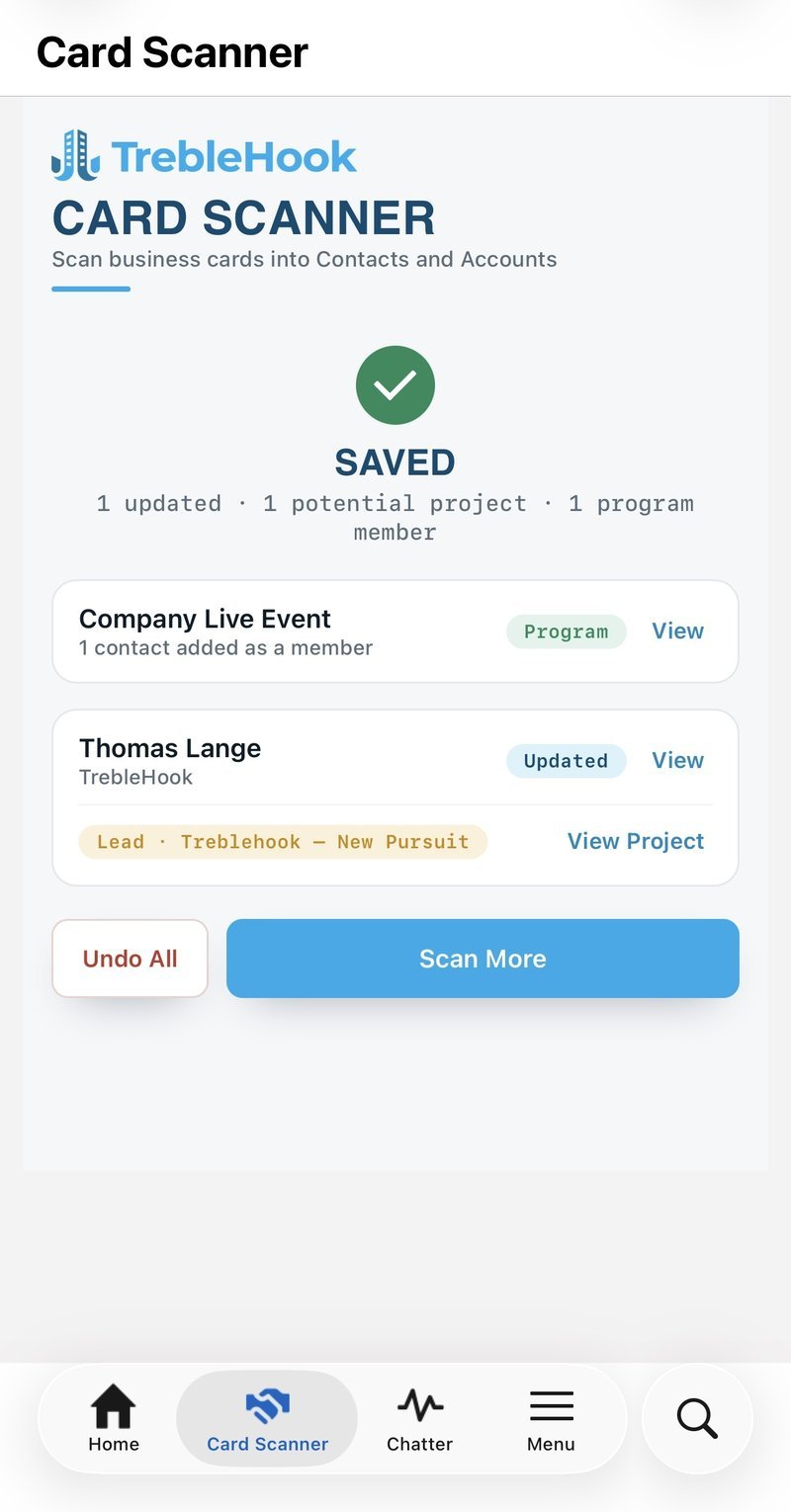
- The OCR and rules still run first, because they're instant and make the app feel quick. But the raw text the camera saw stays visible, tucked under a tap, so you can always check the machine's work against the actual card (#showyourwork).
- After the user snaps the pic, they land on the Contact edit form with all the data pre-filled. Every field can be edited before anything is saved. And in the background, an AI model rereads the messy scan and repairs what only judgment can repair. It was the only thing I found that could look at
jdoeaacme-env.comand correctly put the @ back, because it reasons the way a person would. - Anything the tool creates can be undone with a single tap, on the theory that a tool confident enough to create records for you should be just as willing to take them back.
- The variability question gets answered: the AI pass pulls the information off of a business card the same way a human would.
- The LWC/Apex checks for duplicates and recommends an insert or an update in plain language.
- The user also gets an option to create a Project in the "Lead" Stage. Because that's a core piece of the TrebleHook product and the main reason people end up in this situation. They are looking for new pursuits. The other side of that coin is the Marketing Program or the Campaign. Leads should be linked to the conference you’re at if you are interested in measuring ROI of attending those events.
Was it worth it?
As the Kool-Aid man likes to say while standing in the rubble of his own mess, “oh yeah!” And I can say that without thinking twice, just like the Kool-Aid man (no one makes those types of choices after thinking on it a bunch). It started from a real gap and a set of requirements the people who wanted it had already handed me, and it ends with a tool that does the thing it was asked to do. The feedback that shaped it along the way was the specific, unsparing kind you only get from someone who genuinely wants the thing to work well, even when that someone is you.
And I'm confident about the comparison that matters here: as a way to get a business card into a CRM, this is better than anything Salesforce gives you out of the box. The standard experience is a blank form and your own typing. This reads the card, checks it against your data, fixes its own mistakes, and lets you undo the whole thing if it got something wrong. That comparison I'll stand behind today.
Start from a real need, design so the machine can be wrong without doing damage, and test it against the messy real thing until it holds.
Mostly it proved out a way of working: start from a real need, design so the machine can be wrong without doing damage, and test it against the messy real thing until it holds. That is the part I carry into whatever I build next.
As it turns out, the next thing already has its own article. It's a map, and the pins were never really there.